ServiceNow is a cloud platform that helps companies manage work in one place. It handles IT services, HR tasks, security issues, and business workflows. Many people hear the name ServiceNow but feel confused about how it works inside. The architecture sounds complex. The idea becomes simple when you break it into clear layers. ServiceNow Classes help learners understand the platform architecture, scripting basics, and real time workflow design in a practical way. This guide shows how ServiceNow works from the ground up. Read on to know more.
All About ServiceNow Architecture
Let us understand the architecture of ServiceNow in detail.
What ServiceNow Is at Its Core
ServiceNow runs as a Software as a Service platform. It lives fully in the cloud. Users access it through a web browser. No local installation is required. The platform uses a single data model. All applications share the same database. This design reduces data duplication. It also improves speed and control.
ServiceNow follows a multi-tenant model. Many customers share the same core system. Each customer gets a separate logical instance. Data stays isolated. Security remains strong. Updates apply to all customers at once.
High Level View of ServiceNow Architecture
ServiceNow architecture has three main layers. These layers work together in a fixed flow. The layers include the database layer, the application layer, and the presentation layer. Each layer has a clear role.
The database layer stores data.
The application layer processes logic.
The presentation layer shows data to users.
This structure keeps the system stable. It also makes upgrades easier.
1. Database Layer Explained Simply
The database layer is the foundation. It stores all records. Records include incidents, users, assets, and approvals. ServiceNow uses a relational database. Tables store data in rows and columns.
Each table has a unique name. Fields define data type. Relationships link tables together. Reference fields connect records across tables.
For example, the Incident table links to the User table. This link tells ServiceNow who raised the incident. The database stays normalized. Queries run fast. Indexes improve performance. ACL rules protect data access.
2. Application Layer and Business Logic
The application layer sits above the database. This layer handles logic and automation. It controls how data flows. It decides what happens when a record changes.
Business rules run here. Script includes run here. Workflows and flows run here. UI actions trigger logic from this layer. ServiceNow uses JavaScript on the server side. Scripts execute inside a secure engine.
This rule changes state for high priority records. The logic stays simple. The impact stays powerful. ServiceNow Course builds strong knowledge in ITSM, automation, security controls, and cloud-based service management.
3. Flow Engine and Automation Engine
ServiceNow uses a modern flow engine. This engine replaces older workflows. It handles automation across apps. It triggers actions based on conditions.
Flows include triggers, actions, and data pills. Triggers start the flow. Actions perform tasks. Data pills pass values.
This engine supports low code and pro code. Non developers build flows easily. Developers extend logic using scripts. Automation improves speed. Manual effort drops. Errors reduce.
4. Presentation Layer and User Interface
The presentation layer is what users see. It includes forms, lists, dashboards, and portals. This layer controls experience.
ServiceNow uses HTML, CSS, and client-side JavaScript. UI policies control form behaviour. Client scripts handle dynamic actions. Service Portal and Next Experience use Angular based frameworks. Widgets display data using APIs.
5. Role of APIs in ServiceNow
APIs connect ServiceNow with other systems. REST APIs are common. SOAP APIs still exist. IntegrationHub supports spoke based integration.
APIs allow data exchange. External tools push and pull records. Authentication uses OAuth or basic auth. This call fetches incident data. APIs keep ServiceNow open and scalable. ServiceNow Course in Noida offers hands on exposure to instances, real projects, and industry aligned use cases.
6. Security Architecture in ServiceNow
Security stays central in the architecture. Access Control Lists protect tables and fields. Roles define user power. Domains isolate data when needed. Data encryption protects sensitive values. TLS secures data in transit. Audit logs track changes. Security rules execute before data access. Unauthorized users get blocked. Compliance stays intact.
7. Upgrade and Instance Architecture
Each customer works on an instance. Instances include development, test, and production. Changes move using update sets or pipelines.
ServiceNow pushes upgrades twice a year. The platform handles upgrade scripts. Customer customizations stay intact when built correctly. This design reduces downtime. Innovation stays continuous.
8. Performance and Scalability Design
ServiceNow scales automatically. Load balancers distribute traffic. Application nodes process logic. Database clusters handle queries. Caching improves response time. Asynchronous processing reduces wait time. Scheduled jobs run in background. Large enterprises run millions of records without slowdown.
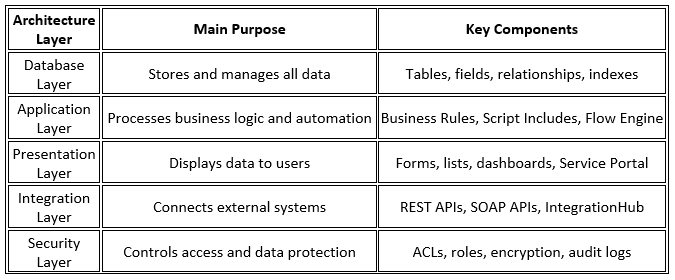
Here is a short and simple table explaining ServiceNow architecture.
Conclusion
ServiceNow architecture looks complex at first glance. The logic becomes clear when broken into layers. ServiceNow Admin Training focuses on user management, configuration, updates, and daily platform administration skills. The database stores data in a clean model. The application layer runs business logic and automation. The presentation layer delivers a smooth user experience. APIs connect external tools with ease. Security protects every action. The cloud model ensures scale and stability. This layered design explains why ServiceNow works so well across industries. It balances power with simplicity.


Post a reply